
I like working from a one-page marketing plan for my clients and for my own business, whether or not we have a multi-page written plan as well. I used to use Microsoft Project to create a Gantt chart of the marketing plan timeline, but few of my clients had the program nor did they want to endure the learning curve in order to be able to use it.
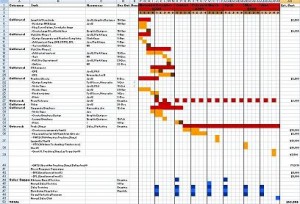
I now use Microsoft Excel to show the marketing objective, tasks, resources, start dates, and timeline as well as the estimated and actual costs and measurable results. My clients can more easily maintain the chart if they choose to, which is so important in light of the fact that marketing is an iterative process, ever-changing as we learn about new tactics, new markets, new ways to do things, etc. On one page we can see where we are, what each person has to do, how much we have or will spend, and what results we’ve achieved.
One Page Marketing Plan
I usually reserve a cell at the top of the Excel spreadsheet to enter in the business goals that the plan supports. Goals should be measurable and achievable, such as close 100 new customers; increase market share by 30%; double revenues… Whatever your goals are, it’s important to keep everyone’s eyes on them and tie your marketing tactics back to them.
I list the marketing tasks to be done in a left side column. These might include trade show marketing, web site updates, creating brochures and white papers, sending out press releases, holding webinars, etc. Next I add a column for who will do the work, either an employee of the company or an outsource vendor. The next columns are for duration and start date.
In the middle I graphically show each task, indicating its start date, duration and end date. The time segments in most of my timelines are by week, so I show beginning and ending dates by starting or ending the graphic in the week in which the date is. I use different colors for milestones, and sometimes I use different colors for activities that fall in different departments, such as marketing and sales.
On the right side are a number of columns for estimated and actual costs, estimated and actual results. You can add columns to track the variance from estimated to actual. For example, if you budgeted $5,000 to update your web site but spent only $3,000, you are under budget by 40%. Or, if you estimate that you will generate 20 qualified leads and you generate 30, you’ve achieved 150% of your goal.
I take the one-page marketing plan a step further and add a column on the far left, which is for category of marketing tasks. Categories include print, web site, social networking, trade shows, etc. I do this so that I can sort the spreadsheet by person responsible, by category, by date, etc. Sorting by category allows you to see at a glance how much you’re doing or spending in any particular marketing area.
Of course a lot more than formatting a one-page marketing plan on an Excel spreadsheet goes into planning your marketing. You need to have a clear vision, mission and goals; an understanding of your target markets and market personae; data on what has or has not worked in the past; analyses of your marketplace and competition; and a clear understanding of a variety of marketing tactics. But the one-page marketing plan is simple and nets out the information I, my associates, and my clients need to know as we implement marketing for the year.
Do you create a marketing plan each year? How? Do you use it? Please comment below.
[Note: I’ve created a sample one-page marketing plan for you to download here. Please provide comments and feedback below – I’d appreciate it!]





{ 6 trackbacks }
{ 26 comments… read them below or add one }
I know this is an old post, but I found it very helpful. Many thanks. I am going to do this for the first time this year. I am an ecommerce marketing manager for a large corporation and I can see this plan lending us a much clearer direction for the year.
Excellent content, my kudos.
HI, do you have a downloadable template of the one page excel marketing plan? I’d like to see it more closer.
Thanks,
Thanks so much for this. Really appreciate the fantastic content. This is the first post I found as I was looking for a marketing timeline strategy and I’m definitely going to use this strategy. Thank you so much!
Hi Olivia,
I will format one for downloading – thanks for the suggestion!
Hi Jennifer
I love the structure and format. This looks like a great planning sheet, and what even better, everything is in one place
Is it possible for you to send me this template please.
Many Thanks
David
Hi there – would you mind sending me the template as well? As they say, copying is the biggest form of flattery! Thank you!
I need one page strategic plan for automotive refinish products
Thank you Olivia. This information is so helpful.
Jennifer, I too am wondering if the document you formatted is available for me to download? If not, are you able/willing to send the template out?
Thank you,
Holly
Hi Jennifer –
This information truly is helpful. Do you have a downloadable template of the spreadsheet or would you be willing to send me the template? Thanks so much!
I am working on that. It seems there are download performance issues. Any thoughts?
Hi Jennifer,
I am new a creating a marketing plan and found this very helpful. I don’t see that you’ve created a downloadable template as yet – would you be willing to send me the template? Thank you for your consideration!
Best regards,
Sally
Hi Sally, I will work to get the template up ASAP.
Wow-format as its answers key issues raised by clients: money spends, ROI and timelines in a easy to comprehend dashboard manner. How do I get to start using it? Regards Anshumalii
This is great! I know it’s been mentioned a few times but is there a download available or would it be possible to get the template emailed Jennifer?
Best regards,
Chris
Does anybody know where to download this excellent spreadsheet? Many thanks!
Just wondering if the template was available?? Thanks
Hi, very nice work. I would love to have a copy of this spreadsheet. Is it available for download? Thanks.
Can you please direct me to (or email me) your wonderful “One Page Marketing Plan” in Excel? I’m unable to find where the template is up (as alluded to in your Aug. 21, 12 comment) and/or downloadable. Many thanks!
Hi Tim,
I set up the download in bold at the end of the blog post. Any feedback is appreciated! Happy Marketing!
Emily, see the download link for the one page marketing plan in bold at the end of the post. It’s also here – https://www.newincite.com/contact/form-to-download-plan/. Please share and comment – I’d appreciate it!
Hi Chris,
https://www.newincite.com/contact/form-to-download-plan/. Let me know how your marketing goes!
https://www.newincite.com/contact/form-to-download-plan/
https://www.newincite.com/contact/form-to-download-plan/. Let me know how you like it!
Joy, use this link, https://www.newincite.com/contact/form-to-download-plan/.
How can I access this template
Hi Aneez, just use the Download form here and it will direct you to the file. https://www.newincite.com/contact/form-to-download-plan/